Account
Call the API
The Checks API is at https://api.scaledpapers.com. Authenticate with a key from API Keys. Creating and revoking keys still happens in the console. This is the same data as that workspace’s console checks. It is not the homepage website checker. The same key connects an agent in Cursor, Claude Code, or Codex — see MCP.
Create a key
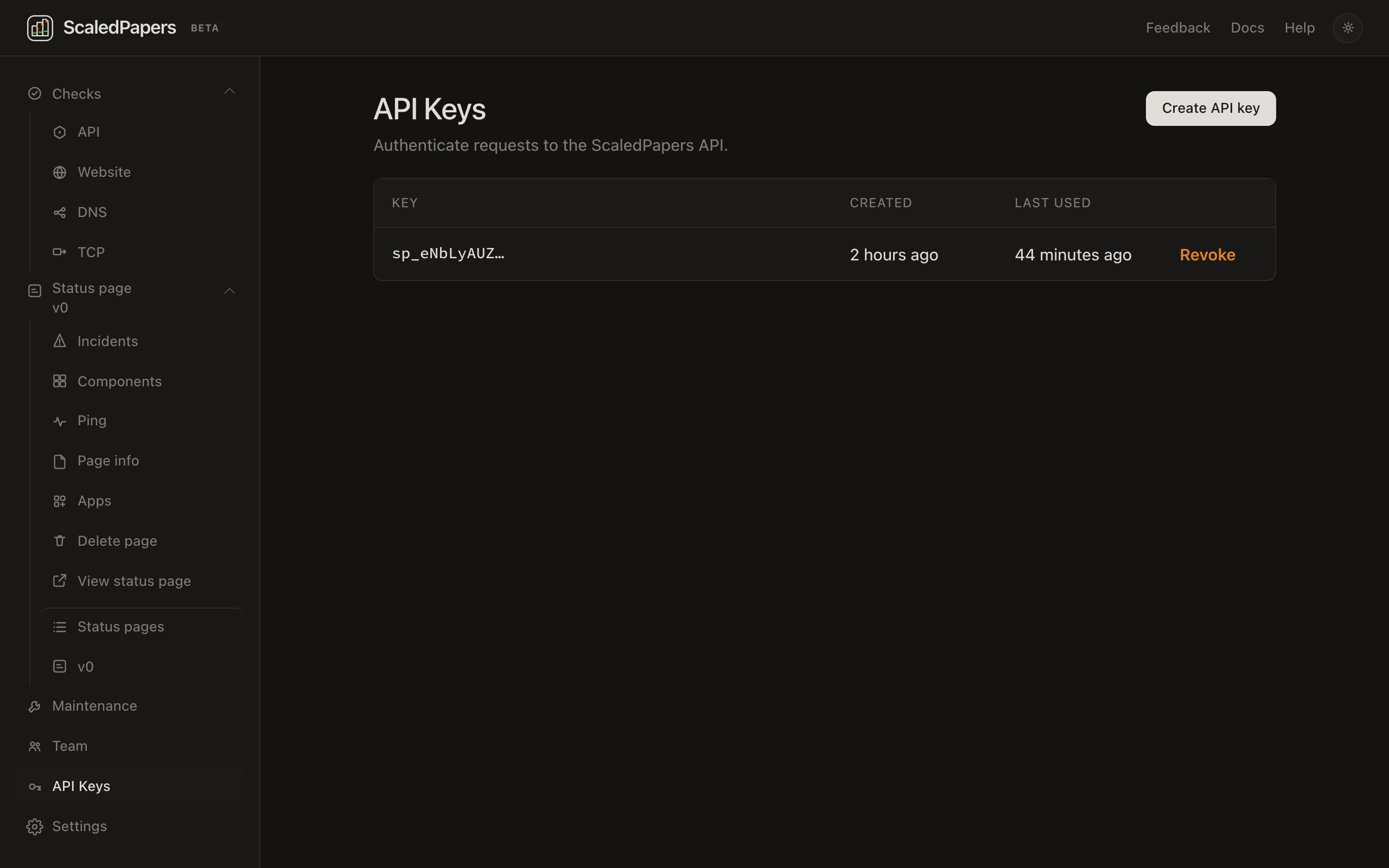
- Sign in. If you are on a team, pick the workspace in the sidebar (Personal vs the invited workspace).
- Open API Keys. Lead: Authenticate requests to the ScaledPapers API. Only an owner or admin of that workspace can create a key. Members cannot.
- Click Create API key.
- Copy the secret and the sample
curl. The page says It will not be shown again.
The list then shows the key prefix (sp_…), Created, Last used, and Revoke. Revoke if a key leaks. Requests with a revoked key stop working.
The key belongs to that workspace. Calls see that workspace’s checks and status pages, not your personal workspace (unless you created the key there). Sending x-scaledpapers-workspace-id does not switch the key to another workspace. /v1/team rejects API keys.
If an admin is later changed to member, existing API keys are not revoked and keep working until an owner or admin revokes them.
Send the secret as:
Authorization: Bearer sp_…
Unauthenticated calls return JSON 401 with {"detail":"Authorization required"}.
List your checks
curl https://api.scaledpapers.com/v1/endpoints \
  -H "Authorization: Bearer sp_…"
Pipe the body to python3 -m json.tool if you want it indented. jq only works when the body is JSON.
Each check includes id, name, type (api, http, dns, or tcp), target, enabled, interval_seconds, regions (names such as us-west-1), current_status, last_observed_at, and a 40-tick recent_ticks bar for the last 24 hours.
| Console kind | type |
|---|---|
| API | "api" |
| Website | "http" |
| DNS | "dns" |
| TCP | "tcp" |
Add, change, or delete a check
Create:
curl https://api.scaledpapers.com/v1/endpoints \
  -H "Authorization: Bearer sp_…" \
  -H "Content-Type: application/json" \
  -d '{
    "name": "Production health",
    "target": "https://example.com",
    "type": "api",
    "regions": ["us-west-1"]
  }'
Useful fields for API / Website:
interval_seconds— 300 or more on the free plan (60 on Pro)http_methodexpected_status_codesbody_containstimeout_secondsfollow_redirectsverify_sslalert_email_enabled
DNS ("type": "dns") uses a hostname as target. Extra fields: dns_record_type (A, AAAA, CNAME, TXT, MX, NS, CAA), dns_protocol (udp or tcp), optional dns_server, and optional dns_expected_values. HTTP-only fields are rejected.
curl https://api.scaledpapers.com/v1/endpoints \
  -H "Authorization: Bearer sp_…" \
  -H "Content-Type: application/json" \
  -d '{
    "name": "example.com DNS",
    "target": "example.com",
    "type": "dns",
    "dns_record_type": "A",
    "dns_protocol": "udp",
    "regions": ["us-east-1"]
  }'
TCP ("type": "tcp") uses a hostname or public IP as target. Extra fields: tcp_port (required, 1–65535), tcp_ip_family (ipv4 or ipv6), optional tcp_payload, and tcp_expected_outcome (connect or fail). HTTP and DNS fields are rejected.
curl https://api.scaledpapers.com/v1/endpoints \
  -H "Authorization: Bearer sp_…" \
  -H "Content-Type: application/json" \
  -d '{
    "name": "cloudflare.com:443",
    "target": "cloudflare.com",
    "type": "tcp",
    "tcp_port": 443,
    "tcp_ip_family": "ipv4",
    "tcp_expected_outcome": "connect",
    "regions": ["ca-central-1"]
  }'
regions is a list of region names or city names (us-west-1, San Francisco). You must send at least one. The five Americas regions are the same as in the console.
Fetch one check: GET /v1/endpoints/{id}.
Pause or resume: PATCH /v1/endpoints/{id} with {"enabled": false} or true.
Delete: DELETE /v1/endpoints/{id}.
Private and loopback hosts are rejected. One component can be linked to only one check.
Run now, history, regions, usage
| Call | What it does |
|---|---|
POST /v1/endpoints/{id}/test |
Same as Run now in the console |
GET /v1/endpoints/{id}/history?hours=24 |
Recent samples (status, status_code, latency_ms, dns_ms, connect_ms, metadata, location_name, location_region) |
GET /v1/endpoints/{id}/status |
Latest state |
GET /v1/endpoints/{id}/outages |
Confirmed down periods |
GET /v1/locations |
Enabled probe regions (name, region) |
GET /v1/usage |
Plan, checks used, monthly probe count and quota, region cap, minimum interval (min_interval_seconds), sample retention (sample_retention_days), status-page cap (max_status_pages) |
To link a check from the API, send site_id, site_slug, and component_id together. alert_incident_enabled posts an incident when the check is down. display_metrics shows the metric on the public status page.
You can also manage status pages themselves with the same key — see Status API.
Maintenance windows
Schedule, list, update, and cancel windows at /v1/maintenance-windows. Members and API keys can write. Send endpoint_ids and/or status_components (site_slug plus component_id or component_public_id). notify_subscribers defaults to true when a public component is targeted and is ignored for engine-only windows.
curl https://api.scaledpapers.com/v1/maintenance-windows \
  -H "Authorization: Bearer sp_…" \
  -H "Content-Type: application/json" \
  -d '{
    "name": "API deploy",
    "starts_at": "2026-09-14T22:00:00Z",
    "duration_seconds": 3600,
    "timezone": "UTC",
    "recurrence": "none",
    "weekdays": [],
    "endpoint_ids": ["11111111-1111-1111-1111-111111111111"],
    "status_components": [{"site_slug": "acme", "component_public_id": "abcdefghijkl"}],
    "notify_subscribers": true
  }'
PATCH /v1/maintenance-windows/{id} reschedules. DELETE /v1/maintenance-windows/{id}?notify_subscribers=true cancels and can email subscribers.